
Apple Watch Series 9: The Complete New Zealand Guide to Apple’s Everyday Powerhouse
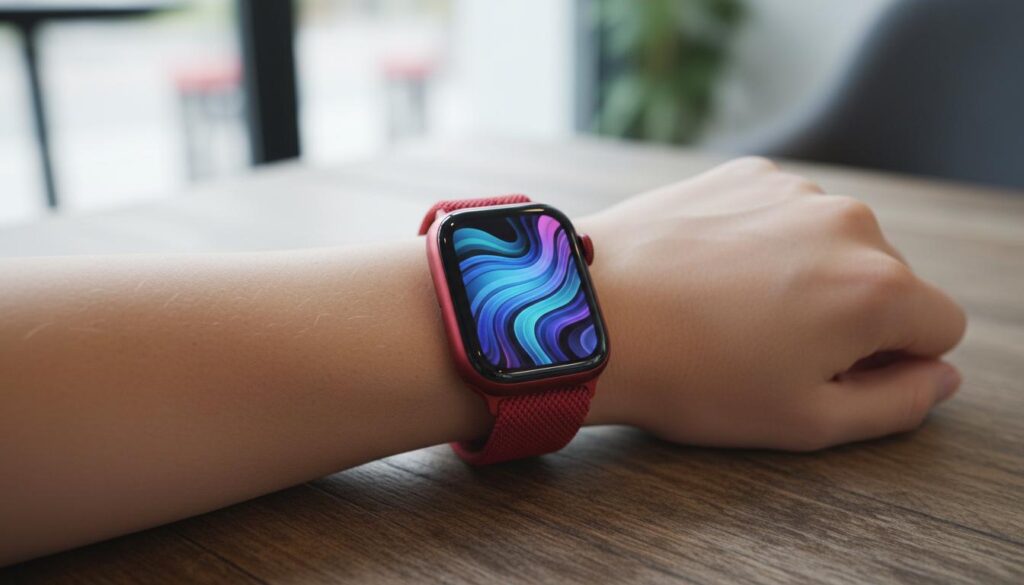
The Apple Watch Series 9 is a fast, bright, and health-focused smartwatch that fits neatly into daily life in Aotearoa. This guide explains what it is, how it works, which model to pick, and whether it’s right for you. You’ll see clear comparisons, practical tips for NZ users, and quick answers to common questions.
What is
Apple Watch Series 9 is Apple’s mainstream smartwatch for people who want reliable fitness tracking, safety features, and smooth iPhone integration without going full adventure-watch. It introduces a quicker S9 chip, on-device Siri for faster requests, a display that can hit 2000 nits outdoors, and the handy Double Tap gesture for one-handed control.
In New Zealand, it supports Apple Pay at most major retailers, fitness and health apps, and optional cellular on supported carriers. It’s swimproof to 50 metres, dust-resistant (IP6X), and compatible with a wide range of bands.
How it works
Core hardware
- S9 SiP and Neural Engine: Snappy performance, better dictation, and efficient on-device Siri for tasks like setting timers or starting workouts without sending audio to the cloud.
- Brighter display: Up to 2000 nits for sunlit runs; drops to 1 nit at night to stay discreet.
- U2 Ultra Wideband: Precision Finding helps you locate a compatible iPhone with directional guidance.
Health and fitness sensors
- Heart health: Optical heart rate, high/low heart rate alerts, irregular rhythm notifications, and ECG in supported regions, including New Zealand.
- Blood oxygen: SpO2 measurements to understand wellness trends. Note: Availability can vary by region; in NZ, it has been available.
- Temperature sensing: Nightly wrist temperature trends for sleep insights and women’s health features, including retrospective ovulation estimates.
- GPS and motion: Accurate distance and pace outdoors; useful for runs along the waterfront or bush tracks.
Safety features
- Fall Detection and Crash Detection: Automatically contact emergency services if you can’t respond.
- Emergency SOS: Hold the side button to call for help; with cellular, you can do this even without your iPhone nearby.
Everyday smarts for NZ
- Apple Pay: Tap to pay for coffee, groceries, and transport where contactless is accepted. Most NZ banks support Apple Pay; check your bank for details.
- Transit: Some regional transport options (like Snapper) support Apple Wallet on iPhone and Apple Watch; availability varies by city.
- Weather and surf: Quick glances for rain warnings or swell reports before you head out.
Types / examples
Sizes and materials
- Sizes: 41 mm and 45 mm.
- Cases: Aluminium (lightweight, matte colours) and Stainless Steel (glossy, more premium). Stainless Steel models are typically Cellular.
- Bands: Solo Loop, Sport Loop, Braided Solo Loop, Sport Band, leather alternatives, Nike sport styles, and Hermès options with Stainless Steel.
Connectivity options
- GPS: Pairs with your iPhone for calls and data.
- GPS + Cellular: Stream music, get texts, and call without your iPhone using an eSIM plan. In NZ, selected carriers offer Apple Watch plans—check Spark, One NZ, and 2degrees for current support and pricing.
Real-world examples
- Runner on Auckland’s Tamaki Drive: Track pace with GPS, use Double Tap to pause a workout at lights, and pay for water with Apple Pay.
- Tradie on site: Hands full? Use Double Tap to answer calls. Fall Detection adds peace of mind in riskier environments.
- Parent juggling school runs: Set reminders with Siri on the wrist, share ETA from Maps, and ping your iPhone with Precision Finding.
Quick comparison
| Model | Best for | Display | Battery life | Chip | Health features | Ruggedness | Cellular option | UWB | Relative price |
|---|---|---|---|---|---|---|---|---|---|
| Apple Watch Series 9 | Most people | Always‑On, up to 2000 nits | Up to 18 hrs (36 in Low Power) | S9 SiP | Heart rate, ECG, SpO2, temperature, sleep | Swimproof 50 m, IP6X | Yes (GPS + Cellular) | U2 | Mid |
| Apple Watch SE (2nd gen) | Value buyers, kids | Non‑Always‑On | Up to 18 hrs | S8‑class | Heart rate; no ECG/SpO2/temperature | Swimproof 50 m | Yes (GPS + Cellular) | — | Lower |
| Apple Watch Ultra 2 | Adventurers, divers | Always‑On, up to 3000 nits | Up to 36 hrs (72 in Low Power) | S9 SiP | All Series 9 features + depth gauge | Titanium, 100 m, EN13319 dive computer | Cellular standard | U2 | Higher |
Pros and cons
Pros
- Fast S9 chip with on-device Siri makes voice tasks and dictation feel instant.
- Brighter screen improves outdoor readability on sunny NZ days.
- Double Tap is genuinely useful when your other hand is busy.
- Strong health suite: ECG, SpO2 (region dependent), temperature trends, sleep stages, cycle tracking.
- Safety features (Crash and Fall Detection) add real-world value.
- Works seamlessly with iPhone, Apple Pay, and Apple services.
Cons
- Battery is day-to-day; heavy GPS or cellular use may require nightly charging.
- Cellular service needs an extra plan and not all NZ carriers/plans support every feature.
- Looks similar to recent models; if you own a Series 7 or 8, the upgrade is incremental.
- Stainless Steel version is more expensive and heavier.
How to use or choose
How to set up Apple Watch Series 9
- Update your iPhone: Make sure your iPhone is on the latest iOS and has Bluetooth and Wi‑Fi on.
- Turn on the watch: Hold the side button until the Apple logo appears.
- Pair with iPhone: Open the Watch app, tap Pair New Watch, and align the animation in the camera viewfinder.
- Choose settings: Sign in with your Apple ID, set a passcode, and pick your apps and faces.
- Enable health features: Turn on Heart Health, ECG (if available), irregular rhythm notifications, and cycle tracking if you use it.
- Set Apple Pay: In the Watch app, add your debit/credit card for tap-to-pay in NZ stores.
- Configure safety: Enable Fall Detection, Crash Detection, and add emergency contacts in the Health app.
- Optional: Add a cellular plan through your carrier within the Watch app.
How to choose the right model in NZ
- Size and fit: Try 41 mm if you prefer a smaller, lighter watch; 45 mm for a bigger screen and longer battery in practice.
- GPS vs Cellular: If you run or work without your iPhone, GPS + Cellular is worth it. Otherwise, GPS is fine and cheaper to own.
- Aluminium vs Stainless Steel: Aluminium is lighter and better for sport; Stainless Steel looks dressier and has sapphire crystal for more scratch resistance.
- Bands: Pick one snug for workouts (Sport Loop or Solo Loop) and another for work or events (Braided Solo Loop or leather alternatives). Swapping takes seconds.
- Carriers and coverage: Check Spark, One NZ, and 2degrees for Apple Watch eSIM support in your area and plan costs.
- Budget and value: Series 9 hits the sweet spot for features. SE suits first-time or family setups. Ultra 2 is for serious outdoor use.
Power and charging tips
- Top up during a shower or breakfast to cover evening workouts.
- Use Low Power Mode on tramps or travel to stretch battery life.
- Fast charge with the included USB‑C magnetic cable and a compatible power adapter.
Privacy and data
- Health data stays encrypted and private by default; you control sharing with apps.
- On-device Siri for many tasks reduces data leaving your watch.
FAQ
Is the apple watch series 9 good value in New Zealand?
Yes. It balances speed, health features, and battery life well. For most people, it’s the best Apple Watch to buy unless you need the Ultra’s rugged extras or the SE’s lower price.
Does Apple Watch Series 9 work without an iPhone?
You need an iPhone for setup (typically iPhone XS or later with a current iOS). With a cellular model and plan, you can leave your iPhone behind for calls, messages, and music, but the iPhone remains required overall.
How long does the battery last?
Apple rates it for up to 18 hours of typical use, or up to 36 hours in Low Power Mode. Workouts with GPS and cellular shorten that; indoor days stretch it.
Is it waterproof?
It’s swimproof to 50 metres for pool and ocean swims and has IP6X dust resistance. Avoid high‑velocity water (like jetski impacts) and scuba diving. For diving, consider Ultra 2.
Can I use Apple Pay in NZ?
Yes. Most major NZ banks support Apple Pay. Add your card in the Watch app to tap and pay with your wrist in shops, on transport where contactless is accepted, and online.
Does ECG and blood oxygen work in New Zealand?
ECG and irregular rhythm notifications are available in NZ. Blood oxygen has been available; feature availability can vary by region and regulatory decisions. Your watch will show available apps during setup.
Which carriers support cellular Apple Watch here?
Selected NZ carriers offer eSIM plans for Apple Watch. Check Spark, One NZ, and 2degrees for current compatibility, coverage, and pricing before you buy.
What about warranty and consumer rights?
Apple provides a limited warranty, and the Consumer Guarantees Act (CGA) in New Zealand offers additional protections. Keep your receipt and contact the seller or Apple if something goes wrong.
What’s special about Double Tap?
You can answer calls, pause timers, snooze alarms, or scroll widgets by tapping your thumb and index finger together—handy when you’re holding a bag or steering a bike.
Should I upgrade from Series 7 or 8?
If you want a brighter screen, on-device Siri, Double Tap, and Precision Finding, Series 9 is a clear step up. If your current watch is running well and battery is strong, you could wait. From Series 6 or older, the upgrade feels bigger.